IT Outsourcing Services

Tychon Solutions is a premier and innovative service provider of custom information technology (IT) solutions and software development services.

Software Development Services

We offer solutions related to software development processes using proven methodologies to ensure successful completion of the project.

Mobile Apps Development

Developing multiple versions of an application to run on a wide variety of platforms like iPhone, Android, BlackBerry, Windows Mobile and other technologies.

IT Consulting Services

Tychons has rich experience in providing consulting services to your business challenges in the IT arena.

Product Development Services

The Product Development experts at Tychons has a broad understanding to know what are the best technologies available to make the product development a success.

Showing posts with label IT Updates. Show all posts

Thursday, 6 December 2012

Facebook Messenger App for Android Phone Users

Facebook, the leader in social networking service have launched a new messenger app for android phones and the advantage of this app is that non account members of facebook can also send and recieve messages to and fro from anyone with a phone number. Users can just sign in with their phone no and name and can send messages to their phone contacts. First it has been launched in India, Australia, Indonesia, Venezuela and South Africa, with other countries shortly after, it added.


Facebook for this service has partnered with all major device manufacturers and their main goal is to make their users connect to all of their phone contacts.

Friday, 23 November 2012

Transactions in Database

Transactions group a set of tasks into a single execution unit. Each transaction begins with a specific task and ends when all the tasks in the group successfully complete. If any of the tasks fails, the transaction fails. Therefore, a transaction has only two results: success or failure. Incomplete steps result in the failure of the transaction.

Users can group two or more Transact-SQL statements into a single transaction using the following statements:

•    Begin Transaction
•    Rollback Transaction
•    Commit Transaction

If anything goes wrong with any of the grouped statements, all changes need to be aborted. The process of reversing changes is called rollback in SQL Server terminology. If everything is in order with all statements within a single transaction, all changes are recorded together in the database. In SQL Server terminology, we say that these changes are committed to the database.

Error Handling

The @@ERROR automatic variable is used to implement error handling code. It contains the error ID produced by the last SQL statement executed during a clients connection. When a statement executes successfully, @@ERROR contains 0. To determine if a statement executes successfully, an IF statement is used to check the value of @@ERROR immediately after the target statement executes. It is imperative that @@ERROR be checked immediately after the target statement, because its value is reset to 0 when the next statement executes successfully. If a trappable error occurs, @@ERROR will have a value greater than 0. SQL Server resets the @@ERROR value after every successful command, so you must immediately capture the @@ERROR value. Most of the time, you'll want to test for changes in @@ERROR right after any INSERT, UPDATE, or DELETE statement.

Example:- 
 

Note:-

It’s used to safe your data during error occurs.


Friday, 9 November 2012

Tips to Prevent Your Email from Hacking

We can proudly say that we live in a world that has developed scientifically and technically in all aspects, but are you sure that these developments are safe and secure. A survey says that more than billions of users are using internet worldwide and email has become one of the important communication tool and here goes one of the beautiful quotes by Tipper Gore “We use tools such as email, not just as a way to keep in daily touch with family members who live in other cities, but also as a way to keep in touch with staff and members of the public.”

Email, the most necessary tool for communication is threatened by a technological threat called hacking. Hacking of email have become so common nowadays and hope these few tips helps you to prevent your email account from hacking.

 • Change your password at regular intervals and always choose a password that cannot be easily guessed by using combinations of upper case, lower case along with numbers and symbols. (but do remember your passwords)
•  Don’t ever give your email id’s to all websites you browse 
•  Beware of what you access and of what is being shared over the network. These public connections can allow others to access your information without you even being aware it is happening. 
•  Always check your email settings such that any of the settings you made were not changed 
• Have an anti-virus software on your computer such that it helps you to recognize any unusual activity
 • Use a browser that has phishing filters and check for filters in your email account if you use Gmail account.

Wednesday, 24 October 2012

Cursor in Database

Cursor:-

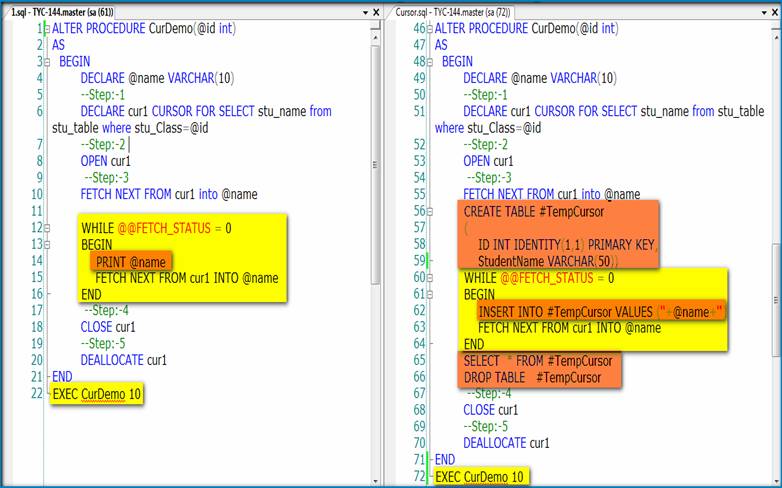
A cursor is a database object that helps in accessing and manipulating data in a given result set. The main advantage of cursors is that you can process data row-by-row.

A result set is defined as a collection of rows obtained from a SELECT statement that meet the criteria specified in the WHERE clause.

Cursors, Serve as a mechanism for applications to operate on a single row or a set of rows.

Cursors enable the processing of rows in the given result set in the following ways:

1) Allow specific rows to be retrieved from the result set.
2) Allow the current row in the result set to be modified.
3) Help navigate from the current row in the result set to a different row.
4) Allow data modified by other users to be visible in the result set.

Structure of Cursors:

The following tasks need to be performed while using a cursor in SQL Server:

1) The cursor needs to be defined and its attributes need to be set.
2) The cursor needs to be opened.
3) The required rows need to be fetched from the cursor. Fetch refers to the process of retrieving a row from the result set.
4) The data in the current row of the cursor can be modified, if required.
5) The cursor needs to be closed.
6) The cursor should be deallocated.

This is a good practice as resources used by the cursor are released.


Result:-  


Note:-

 Cursor is used to read a record on row by row basis, so that above cursor stored procedure shows only one record at a time.

 So we apply the “while” condition and get all the records row by row.


Result:- 


Conclusion:-

(I)    It is returned by only one row at a time. So it gives less performance.
(II)    If the result set are less than 50 or 100 records it is better to go for cursors.


Sunday, 21 October 2012

Continuation of Normalization Forms

Fourth Normal Form (4NF):-

(i)    Remove the multi-valued  dependency.
(ii)    Make separate table for multi-valued  Fields.


Result:-

 
Fifth Normal Form (5NF):- 

(i)    Remove the join dependencies.
(ii)    Break the database table into smaller and smaller tables to remove all data redundancy.


Result:-


Monday, 15 October 2012

Normalization in Database

Normalization:-

The set of rules used to design the table.

Benefits of Normalizing:-

1)    Eliminate data redundancy.
2)    Improve performance.
3)    Query optimization.
4)    Faster update due to less number of columns in one table.
5)    Index improvement.

Different types of Normalizations form available in the Database:-


1)    INF.
2)    2NF.
3)    3NF.
4)    Boyce-Codd Normal Form (or) 3.5NF.
5)    4NF
6)    5NF.

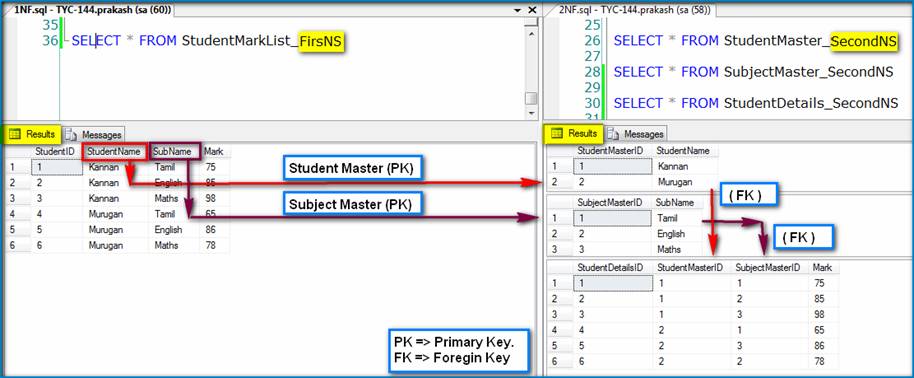
First Normal Form (1NF):

(i)    Eliminate duplicative columns from the same table.
(ii)    Create primary key.

Example:-


Second Normal Form (2NF):

(i)    Remove subsets of data that apply to multiple rows of a table and place them in separate tables 
(ii)   Create relationships between these new tables and their predecessors through the use of foreign
         keys.
(iii)  Remove columns which create duplicate data in a table and related a new table with Primary
         Key – Foreign Key relationship.


Example:-

Step: - 1


Step: - 2


Tuesday, 9 October 2012

How to Say Thank You in an Email ?

Saying Thank You in an impressive way is very important for any business and thanking people is a very good manners. As by the words of  Ralph Marston "Make it a habit to tell people thank you. To express your appreciation, sincerely and without the expectation of anything in return. Truly appreciate those around you, and you'll soon find many others around you. Truly appreciate life, and you'll find that you have more of it"


Whenever you are writting a letter to your higher authority in office or when you write any letter, you should thank in your emails. As by the words of Ralph, please make this as a habit because everyone wants to feel appreciated and these kind words combined with sincere appreciation of their efforts will go a long way. Let us See how to say "Thank You" in an email.

At the beginning of the email

Thanking your reader is a wonderful way of opening an email. It sets the right tone and makes the reader feel appreciated, which is particularly vital if you require future help from them.

Thank you for contacting us.

If someone writes to enquire about your company’s services, begin your email with this sentence. Show your appreciation for their interest in working with your company.

Thank you for your prompt reply.

When a client or colleague replies to a previous email in a short amount of time, notice and acknowledge this. If the reply wasn’t quick, simply removing “prompt” will work, or, you can opt for, “Thank you for getting back to me.”

Thank you for providing the requested information.

If you have asked someone for information, and they took the time to send it to you, use this sentence to demonstrate that you value what they’ve done.

Thank you for all your assistance.

If someone has gone out of their way to help you, thank them! If you want to offer more specific recognition for what they have done, follow this sentence with, “I truly appreciate … your help in resolving the problem.”

Thank you raising your concerns.

Even if a client or manager writes to express some concerns they have regarding your work, you can still thank them. This shows that you value their input and will take their concerns seriously. Alternatively, you may wish to use, “Thank you for your feedback.”

At the end of the email

While thank yous at the beginning of an email are typically written to thank the reader for past actions, thank yous at the end of an email tend to imply you are thanking the reader for a future action. By showing your appreciation in advance, you are more likely to get a positive reaction.

Thank you for your kind cooperation.

If you need the reader to cooperate by assisting you with something, then thank them in advance for their cooperation.

Thank you for your attention to this matter.

Similar to above, this sentence implies that you would appreciate the readers’ further assistance.

Thank you for your understanding.

Use this sentence if you’ve shared something that may inconvenience or negatively impact the reader.
 
Thank you for your consideration.

If you are requesting a benefit or an opportunity, such as when you apply for a new job, end your email with this sentence.

Thank you again for everything you’ve done.

This sentence, which is used at the end, is a bit different from those above. Use this if you have already thanked the reader at the beginning of the email, but due to their great efforts, you wish to thank them again for their past actions.

As by this post i should never forget to thank the source from which our employee got this useful information. On behalf of our Tychons Family, i would like to thank the source website from which we got this useful information. 

Monday, 8 October 2012

Types of Trigger Storage in SQL

Tychons has a large pool of experienced and skilled professionals with finest talents and customer oriented attitudes for delivering customized solutions of high quality with a great speed and at a competitive cost.  Our employee’s doesn’t hesitate to share useful information and always follow the words of Winston Churchill "If you have knowledge, let others light their candles with it." Here is one of the useful information shared by our employee.

Triggers:-

 They are two types of trigger.

1)      Before Trigger.

2)     After Trigger.

“BEFORE” AND “AFTER” Triggers are used to modify the data in the table. 
Where the modified values are stored in SQL and how to retrieve it?

1) “DELETED” keyword used to retrieve value from “BEFORE/AFTER Trigger UPDATE”  Process.

2)  “DELETED” keyword used to retrieve value from “BEFORE/AFTER Trigger DELETE”   Process.

3) “INSERTED” keyword used to retrieve value from “BEFORE/AFTER Trigger INSERT” Process.

Microsoft Details about Windows 8 Upgrade Schedule

Yet Microsoft is to officially lauch its windows 8, but microsoft have started to deliver some updates. On Microsoft windows 8 official blog, it has provided upgraded details of it. It has first released the Bing apps first which includes richer search results for local content and images. And also other features such as ability to zoom on search results with related queries and an option to select image from bing were the other updates of windows 8 apps.

October 26 is the official launch of windows 8 and till that, updates will be getting a boost in the days.  The updates would be skydrive, Mail, Calendar, People, and Messaging, photos, maps, bing, finance, news, sports, travel, weather, video, music and games.