IT Outsourcing Services

Tychon Solutions is a premier and innovative service provider of custom information technology (IT) solutions and software development services.

Software Development Services

We offer solutions related to software development processes using proven methodologies to ensure successful completion of the project.

Mobile Apps Development

Developing multiple versions of an application to run on a wide variety of platforms like iPhone, Android, BlackBerry, Windows Mobile and other technologies.

IT Consulting Services

Tychons has rich experience in providing consulting services to your business challenges in the IT arena.

Product Development Services

The Product Development experts at Tychons has a broad understanding to know what are the best technologies available to make the product development a success.

Showing posts with label Tychons News. Show all posts

Thursday, 6 December 2012

Facebook Messenger App for Android Phone Users

Facebook, the leader in social networking service have launched a new messenger app for android phones and the advantage of this app is that non account members of facebook can also send and recieve messages to and fro from anyone with a phone number. Users can just sign in with their phone no and name and can send messages to their phone contacts. First it has been launched in India, Australia, Indonesia, Venezuela and South Africa, with other countries shortly after, it added.


Facebook for this service has partnered with all major device manufacturers and their main goal is to make their users connect to all of their phone contacts.

Friday, 23 November 2012

Transactions in Database

Transactions group a set of tasks into a single execution unit. Each transaction begins with a specific task and ends when all the tasks in the group successfully complete. If any of the tasks fails, the transaction fails. Therefore, a transaction has only two results: success or failure. Incomplete steps result in the failure of the transaction.

Users can group two or more Transact-SQL statements into a single transaction using the following statements:

•    Begin Transaction
•    Rollback Transaction
•    Commit Transaction

If anything goes wrong with any of the grouped statements, all changes need to be aborted. The process of reversing changes is called rollback in SQL Server terminology. If everything is in order with all statements within a single transaction, all changes are recorded together in the database. In SQL Server terminology, we say that these changes are committed to the database.

Error Handling

The @@ERROR automatic variable is used to implement error handling code. It contains the error ID produced by the last SQL statement executed during a clients connection. When a statement executes successfully, @@ERROR contains 0. To determine if a statement executes successfully, an IF statement is used to check the value of @@ERROR immediately after the target statement executes. It is imperative that @@ERROR be checked immediately after the target statement, because its value is reset to 0 when the next statement executes successfully. If a trappable error occurs, @@ERROR will have a value greater than 0. SQL Server resets the @@ERROR value after every successful command, so you must immediately capture the @@ERROR value. Most of the time, you'll want to test for changes in @@ERROR right after any INSERT, UPDATE, or DELETE statement.

Example:- 
 

Note:-

It’s used to safe your data during error occurs.


Wednesday, 24 October 2012

Cursor in Database

Cursor:-

A cursor is a database object that helps in accessing and manipulating data in a given result set. The main advantage of cursors is that you can process data row-by-row.

A result set is defined as a collection of rows obtained from a SELECT statement that meet the criteria specified in the WHERE clause.

Cursors, Serve as a mechanism for applications to operate on a single row or a set of rows.

Cursors enable the processing of rows in the given result set in the following ways:

1) Allow specific rows to be retrieved from the result set.
2) Allow the current row in the result set to be modified.
3) Help navigate from the current row in the result set to a different row.
4) Allow data modified by other users to be visible in the result set.

Structure of Cursors:

The following tasks need to be performed while using a cursor in SQL Server:

1) The cursor needs to be defined and its attributes need to be set.
2) The cursor needs to be opened.
3) The required rows need to be fetched from the cursor. Fetch refers to the process of retrieving a row from the result set.
4) The data in the current row of the cursor can be modified, if required.
5) The cursor needs to be closed.
6) The cursor should be deallocated.

This is a good practice as resources used by the cursor are released.


Result:-  


Note:-

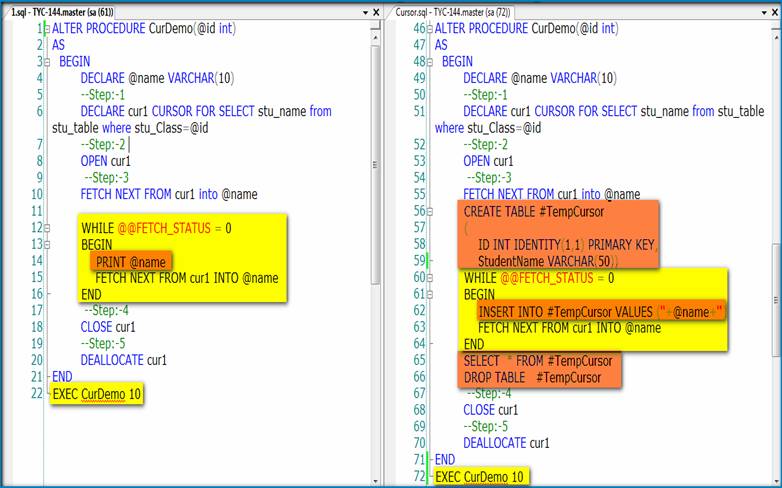
 Cursor is used to read a record on row by row basis, so that above cursor stored procedure shows only one record at a time.

 So we apply the “while” condition and get all the records row by row.


Result:- 


Conclusion:-

(I)    It is returned by only one row at a time. So it gives less performance.
(II)    If the result set are less than 50 or 100 records it is better to go for cursors.


Guidelines for Writing Official Emails

Communication in any form should be simple and effective and with growing number of doing business transactions online, emails have become one of the necessary tool that have become so essential in any business. While sending official emails, make sure that it follows their respective guidelines because official emails are the one that going to represent us. Here are few guidelines to be followed while writing official emails. 

  • Verdana is the appropriate font and its size should occur between 9.5 - 10  

  • It should have the structure such as situation, action items, information and conclusion

  • Use black or blue color for writing and for highlighting purpose, make the word bold and avoid using red color since it signifies danger

  • Follow the appropriate greetings such as Hi for americans, Hello for Europeans and Dear for Asians

  • To be more formal we could use Dear Mr. /Ms. followed by Last name or Full name. We should not use Dear Mr. /Ms. followed by First name alone. 

  • We should not put '/' in greetings like Hi X/Y. Instead we should say Hi X and Y.

  • We should not use 'Thanks and Regards'. Instead we should say:
    Thank you
    Regards 

  • Do not use can for requesting something and you can use could instead

  • Avoid writing please find the attached file since the reciever should not find or search for the mail because it is already  there so write 'The file has been attached for your reference'.

  • Avoid sentences like as per your mail since per is used for weights such as kg etc. You can use according to your mail

  • Please revert is the appropriate word for writing please revert back  

Source: http://www.citehr.com/59672-email-etiquette-official-mails.html

Sunday, 21 October 2012

Continuation of Normalization Forms

Fourth Normal Form (4NF):-

(i)    Remove the multi-valued  dependency.
(ii)    Make separate table for multi-valued  Fields.


Result:-

 
Fifth Normal Form (5NF):- 

(i)    Remove the join dependencies.
(ii)    Break the database table into smaller and smaller tables to remove all data redundancy.


Result:-


Thursday, 18 October 2012

Normalization in Database (Continuation)

In Tychons, we never get fed up of sharing information and even working too. On our previous posts regarding normalization in database, we saw what is normalization? Its benefits and we saw how many different types of normalization forms are available and also we saw the first two of its types such as first and second normal form. Now let us see third normal form. 

Third Normal Form (3NF):-

(i)    Remove columns that are not fully dependent upon the primary key.

Example:-


Boys-Codd Normal Form (BCNF or 3.5NF):-
  1. A relation is in Boyce-Codd Normal Form (BCNF) if every determinant is a “candidate key”.
  2.  Remove the non trival functional dependency.
  3.  It’s considered a special condition of third Normal form.
Candidate key:-

Define:-
 More than one primary key in the table, that primary key is called as candidate key.

3NF:-

Step:1


 Step:2


Note:-

•    For each subject, every student is educated by one teacher.
•    Every teacher teaches one subject only.
•    Each subject can be teached by more than one teacher.

3NF to BCNF:-

1)    Student is not a “Primary key”.
2)    Teacher and Subject is “Primary key”.


Note:-

A relation is in BCNF, if and only if, every determinant is a candidate key. So filter the non primary key column.

On Behalf of tychons family, i would like to thank our employee who has been sharing continuos information regarding normalization in database. Do watch our blog for regular updates on remaining types of normalization forms.

Monday, 8 October 2012

Types of Trigger Storage in SQL

Tychons has a large pool of experienced and skilled professionals with finest talents and customer oriented attitudes for delivering customized solutions of high quality with a great speed and at a competitive cost.  Our employee’s doesn’t hesitate to share useful information and always follow the words of Winston Churchill "If you have knowledge, let others light their candles with it." Here is one of the useful information shared by our employee.

Triggers:-

 They are two types of trigger.

1)      Before Trigger.

2)     After Trigger.

“BEFORE” AND “AFTER” Triggers are used to modify the data in the table. 
Where the modified values are stored in SQL and how to retrieve it?

1) “DELETED” keyword used to retrieve value from “BEFORE/AFTER Trigger UPDATE”  Process.

2)  “DELETED” keyword used to retrieve value from “BEFORE/AFTER Trigger DELETE”   Process.

3) “INSERTED” keyword used to retrieve value from “BEFORE/AFTER Trigger INSERT” Process.

Friday, 27 July 2012

Google Enters in Broadband Service

The web search leader Google inc have now entered to broadband internet service which is 10^2 faster than other traditional US cable and telecommunication companies. They have unveiled this high speed google fibre service in Kansas City, Missouri, and could start installations in September, executives said. Here are few quick points on the feature of Google fibre. 

  • It allow users to search live channels and includes more than 100 networks and costs $120 a month for a package of TV, 1 gigabit per second Internet speeds and 1 terabit of cloud storage. 

  • The download speeds would be around 1 gigabit a second, according to Google executives. 

  • The fibre includes more than 100 networks and costs $120 a month for a package of TV. 

  • The package includes popular networks owned by major media companies  

  • Google charges $300 as  installation fee

  • At present this broaband service covers central Kansas City, Missouri and all of the city of neighboring Kansas City

  • Google is offering its Nexus 7 tablet with the Google TV app to early users of the service

  • It has the ability to record eight TV shows at a time and store up to 500 hours of high definition programming.    

  • Consumers must pay $10 to register their household online for service. About 50 "neighbors" will need to register in order for their area to be eligible for installation services, according to Google executives.

  • Offer Nexus 7 tablet with the Google TV app to early users of the service

Do google will succeed in broadband internet service as like its search engine service. For more info, Keep watching Tychons News

Source: economictimes.indiatimes

Monday, 23 July 2012

Will Yahoo Get Back on Track?

Most of us when put  search for yahoo in news section, we can see the updated news about its chief executive officer, Marissa Mayer. A source says that "Second-quarter earnings announced last week reflected a slide of 4.4 per cent from the year before, but the company had $1.22 billion in revenue and earned $226.6 million. Display advertising was actually up, to $534.9 million, compared with $523.5 million from the year before. So Mayer may be taking over a stagnating company, but it is not a collapsing one. Yahoo has what all media companies want, which is a large audience. The company just doesn't know what to do with it."  

Though these things are still in news, the current news about yahoo is the Mayer salary package. In spite of these different news, Mayer for the first time reach out to the company employees for the first time and asked them to stay focused while she devises a strategy to get Yahoo back on track.  Though these news keep coming on, what people expect is whether Yahoo will get back to its position and will Marissa be a part of it? Lets wait and see.

Tuesday, 26 June 2012

8 Things you should never do in Office

  •   Peep into someone’s laptop/desktop
The most annoying person in office is the one who peeps into his colleagues laptop screen. Make sure you are not this annoying person. No matter the urge to see what other people are up to, you must save yourself the embarrassment of being labelled the office’s peeping tom.

  •  Walk around like you own the place
It is great to be confident, but it is a sin to be cocky. So under no circumstances should you walk around like you own the place. It is advisable to keep your smartness in check and not throw your weight around. Keep it easy going and genuine, and everyone in office will like you instead of bitching about you.

  •   Be loud
Oh my GOD!Please don’t be that loud person in office. Keep your voice level in check, do not play loud music and stay clear of all things loud. Loud people annoy colleagues like few other people/things do. Train yourself to talk softly yet be audible.

  •  Gossip
We are sure you have heard this one before. It is imperative to stay clear of gossip, but we all know that this is not possible. Every nook and corner of office is full of gossip mongers. What you can do however, is keep your tongue in check. Don’t bitch everyone out to everyone, and don’t allow others to christen you the gossip king.

  •  Stealing
Every office goer at some point in time is inclined to steal some office stationery: a pen, a paper, a folder, or a print out. Doing so once in a blue moon is okay, but don’t make a habit of it. Stealing is bad and you will be answerable and payable if you are caught.

  •  Lie/Blame others
When you find yourself in a soup or in tough situations you will be inclined to lie or shift the blame of your wrong doing on someone else. If you do this, you are putting not only your reputation at stake but your job too. Always stick to the honesty policy and play fair.

  •  Share your personal problems
No one lives an easy life. Everyone has their share of personal problems just as you have yours. It would be naïve to share your personal problems with your work colleagues. We suggest you leave these issues at home and come to office with a clear mind. Remember, your colleagues aren’t your personal agony aunts.

  •   Make out
Irrespective of how hot that colleague of yours is, making out in the office is just unpardonable. Making out is an extremely private affair and an office is the least private of places you know. Besides, if somebody catches you in the act, you can bid your job farewell.